Build your controller.

Zonea is a multi-touch custom controller. Design your own layout with faders, knobs, buttons, encoders, XY pads, VU meters, video monitors, and more. Perform with a controller built exactly for your workflow. No hardware limits. No fixed layouts. Skin it any way you want and connect it to any software that supports MIDI and other protocols.

From live stages to studios and experimental setups, Zonea adapts to your workflow and scales with your needs. Stable, fast, and built for demanding environments where reliability matters.

Available now for Windows and Linux. Windows on ARM and macOS are coming soon, and one perpetual license covers them all.

See Zonea in action

One-take dub improvisation by The Dub Factory, launching clips and looping in Bitwig. One of many ways to play Zonea.

Built to perform. Yours to design

Instant launch, glass-smooth touch, every tap lands instantly. Drive your whole rig from multiple touchscreens at once, each running its own instance, and build whatever you want across up to 144 fully customizable pages.

Sends MIDI, hotkeys and OSC, controls OBS Studio directly, fires HTTP commands, and shines on 120 fps+ touch displays with a high touch-polling rate, while still running flawlessly on standard 60 fps touchscreens.

A floating editor you can drag to any monitor keeps your canvas always within reach, lay out, color, and fine-tune every control in real time, right where it’s most comfortable to work. Mix and match buttons, sliders, pads, encoders and knobs to build and control exactly what you need.

See what you control

Zonea’s unique External UI feature lets you capture any vital region of an application, your DJ software, DAW, or any other tool, and pin it live onto your surface, making it part of your controller template. Resize it, stack it, and place it anywhere on your controller in real time, with zero latency and near-zero CPU and GPU usage.

Need access to the application underneath? Punch transparent holes, circular or rectangular, directly through your surface to see and interact with the software below. Your multi-touch controls and your software, together on the same screen.

Compatible with your favorite software

DJING

DAWS & MUSIC PRODUCTION

VIDEO & STREAMING

All product names, logos and brands are property of their respective owners and are used solely to indicate software compatibility. No affiliation or endorsement is implied.

Inside Ableton Live, Bitwig Studio and FL Studio, with nothing to map

Zonea ships with its own scripts for the three. Install, open the DAW, and these widgets are already talking to it.

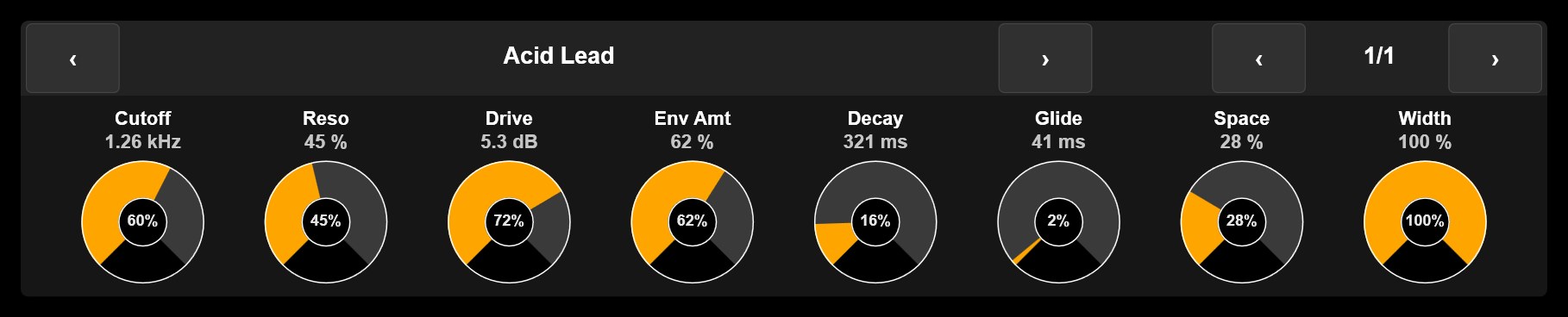
Device Panel: Acid Lead, page 1/1, eight knobs with Cutoff 1.26 kHz, Reso 45 %, Drive 5.3 dB, Env Amt 62 %, Decay 321 ms, Glide 41 ms, Space 28 % and Width 100 %

Your plugins, under your fingers

The Device Panel follows the plugin you select: eight knobs with the real parameter names and values, banks to page through, no value jumps. Touchscreen VST control.

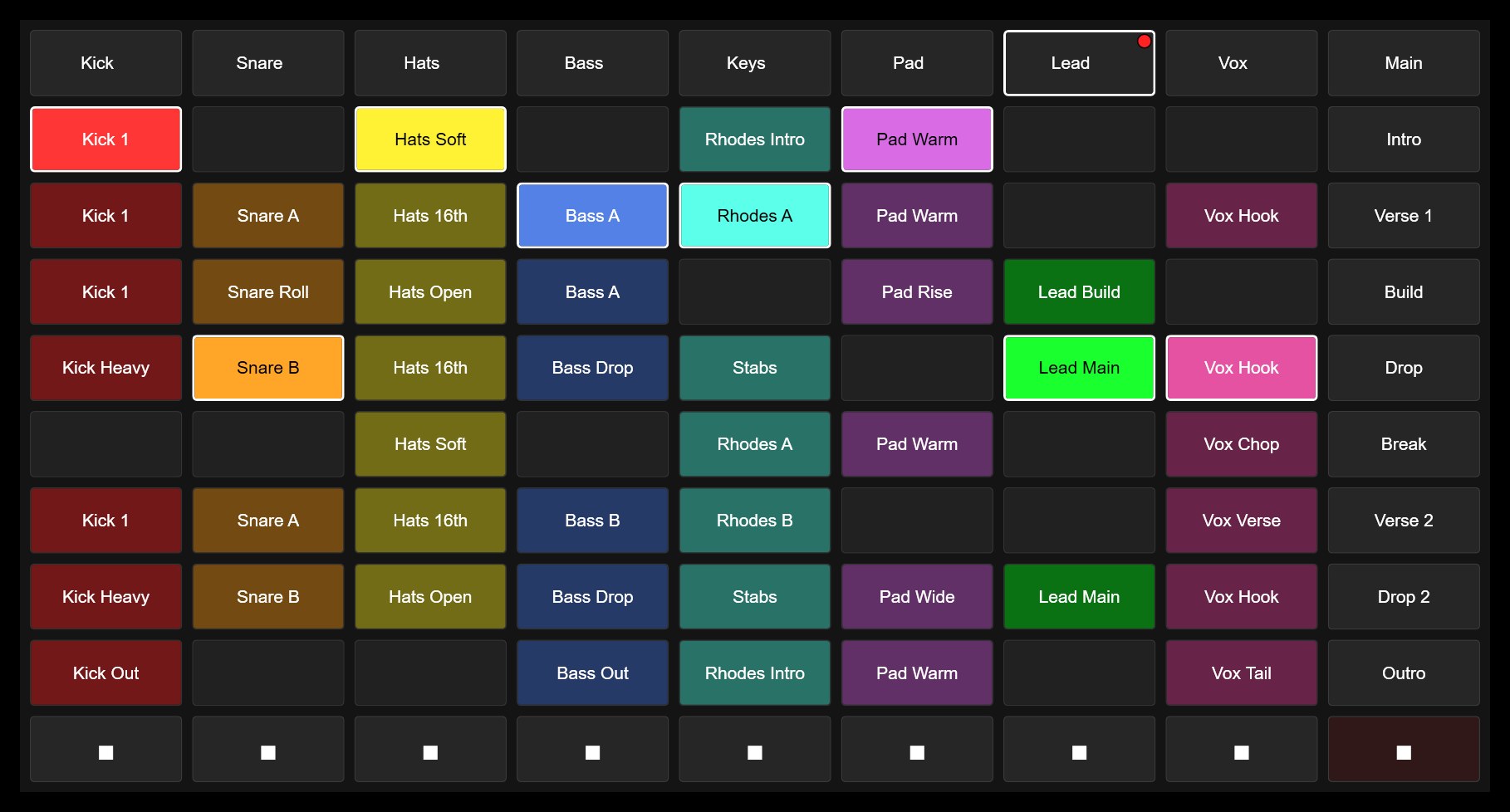
Clip Grid: tracks Kick to Vox with their clips, colours, playing state, scenes Intro to Outro and the stop row

Launch clips with their real colours and names

The Clip Grid mirrors your session: clips, scenes, stops, playing state, all live. Tap to launch, slide for a glissando across clips, flip the grid to match your view. Plus a mixer with the DAW's own meters, transport, and in FL Studio the step sequencer.

50.000+ Icons

Stop hunting for the right look. Zonea ships with a built-in library of over 50,000 vector icons across 34 curated packs , Font Awesome, Material, Bootstrap, Feather, Ionicons and more — right inside the editor. Search, tap, done. Your button is styled in seconds.

Because every icon is vector, it stays razor-sharp at any size, from a tiny utility key to a full-screen pad. No blurry bitmaps, no importing files, no guesswork. Just open the picker, find the symbol that speaks to your workflow, and make it yours.

Skin Anything

Drop in your own PNG or GIF images and Zonea wraps them onto any widget: buttons, knobs, faders, pads, displays, even full-page backgrounds. Want it to look like your favorite hardware, your studio’s branding, or something nobody has ever seen? Load the image and it’s done.

Skins are state-aware, not just wallpaper. Buttons get distinct ON and OFF artwork. Knobs and encoders take a static base plus a rotating overlay that spins with the value. Faders get a custom track and a custom cap. And because animated GIFs are supported, your meters and frames can actually move. Every image fills the widget edge-to-edge, at any size.

Live Video On Your Surface

Zonea speaks the three video protocols that drive modern streaming and broadcast: NDI, Spout and OMT. Pull a live feed straight from OBS or vMix program output, preview, a camera, a media player, or any source on your network and drop it right onto your control surface. Now you trigger scenes, ride faders and fire cues while watching exactly what’s going to air, all in one place.

It’s built for real production. Every feed is GPU-accelerated and composited with near-zero overhead, so video stays smooth even at full resolution while you perform. Each source runs in its own isolated process, if a feed drops, your surface never does. Place as many video widgets as you want, resize them anywhere on the canvas, and build the exact monitoring layout your show needs.

Never get lost

Tooltips live everywhere in Zonea, just hover over anything in the editor with your mouse, objects, tools, functions, settings, and it instantly tells you what it does and how to use it. No manuals to dig through, no guesswork, no dead ends.

Learn as you build, move faster, and master your surface from day one, with clear, helpful guidance across the entire editor.

One App, Any Setup

All-in-one touch PC

All-in-one touch PC

Touch tablet or 2-in-1 PC

Touch tablet or 2-in-1 PC

Touch-screen laptop

Touch-screen laptop PC

Desktop PC with a big touch screen

Desktop PC + touch monitor (21.5″, 24″, 27″ or bigger)

Mini PC with a big touch screen

Mini PC + touch monitor (21.5″, 24″, 27″ or bigger)

Laptop with a touch screen next to your DAW

Laptop PC + touch monitor (21.5″, 24″, 27″ or bigger)

Zonea runs at any resolution from 800×600 and up, on any screen you throw at it; the sweet spot for touch monitors is 21.5 to 27 inches, big enough to perform and compact enough for any booth or desk. Make it your main controller, or the extra one that never runs out of knobs: your hardware is fixed, Zonea is not, so design the faders, pads and buttons your gear is missing and put your whole show one touch away, right where your hands are.

Synthesizer

Zonea + your synths

Pad controller

Zonea + your pads

Mixer

Zonea + your mixer

MIDI keyboard

Zonea + your keys

Music software

Zonea + your software

One license. Every platform.

Windows x64 and Windows on ARM

Windows x64 now · ARM
coming soon

macOS

macOS
coming soon

Linux

Linux
available now

$14.99

One license, every platform. Windows 64-bit and Linux are ready to use today; Windows on ARM and macOS are coming soon, included at no extra cost, on up to two of your computers. Your license is the full perpetual license, yours forever, with every update included.

Try it free for 14 days first, no credit card needed. Then get the full perpetual license: one payment, every update included.

Buy now $14.99

Got questions? We've got answers

Ask anything in your own language: we reply in your language, and in English too so the whole community can follow along. Get real answers from our team and community, and request the features you want to see next: Zonea is built together with its users. The forum is free; you only need an account to post.

Free community forum access

Built on Experience

20+ years of pushing touch performance forward.

  1. Starting with MonoTouchLive (2006), the first touchscreen controller for Ableton Live built to run on everyday touchscreens, no dedicated hardware required.

  2. Followed by SmithsonMartin Emulator, winner of the DJ Mag Tech Award for Most Innovative Product (2011).

    DJ Mag Tech Awards
  3. Later Chameleon.

  4. Now introducing Zonea v3.x.

Maetrik Live AKA Maceo Plex @ Break & Enter, Toronto, commanding his Ableton Live set with MonoTouchLive (10-31-2008)