
Touchscreen VST control

Control your VST plugins from a touchscreen

Zonea puts the parameters of the plugin you are working on under your fingers: real names, real values, eight knobs at a time. In Ableton Live, Bitwig Studio and FL Studio there is nothing to map. For any other DAW or plugin, MIDI learn does the rest.

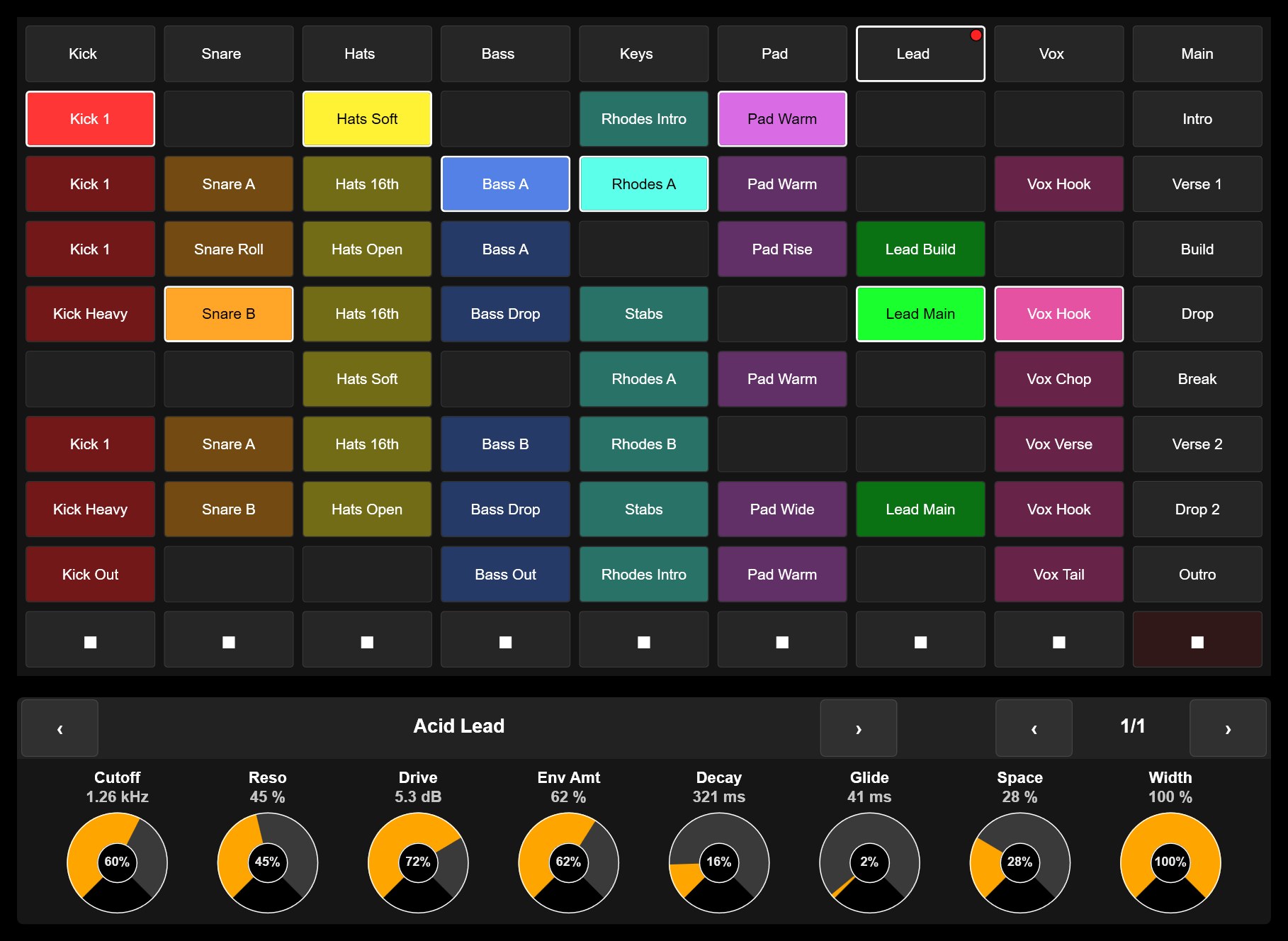
Zonea surface: clip grid with the real clip names and colours and the Device Panel showing the Acid Lead rack with its eight macros

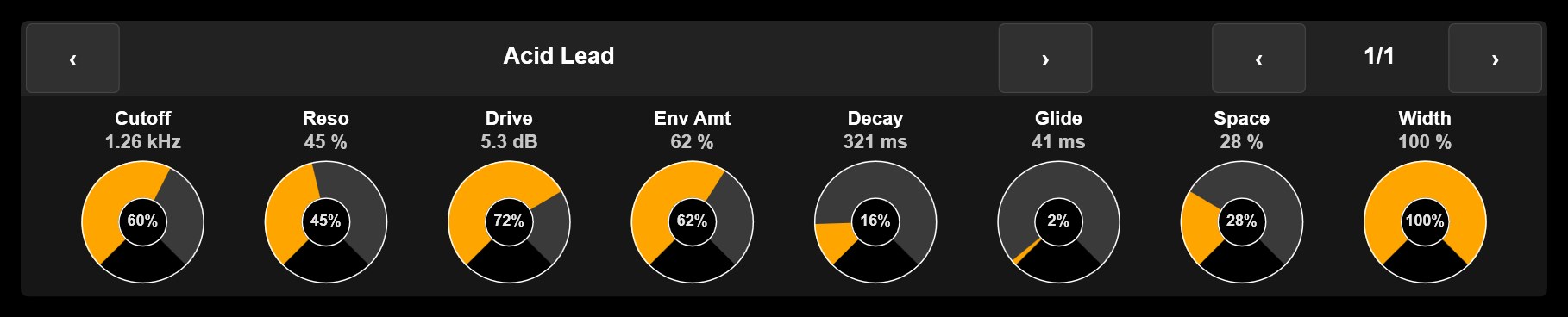
The Device Panel: a screen and eight knobs, for whatever plugin is selected

Device Panel: Acid Lead, page 1/1, eight knobs with Cutoff 1.26 kHz, Reso 45 %, Drive 5.3 dB, Env Amt 62 %, Decay 321 ms, Glide 41 ms, Space 28 % and Width 100 %

Follows your selection, no mapping

Click a synth or an effect in the DAW, or tap a track on Zonea's clip grid, and the eight knobs jump to that device by themselves. The header shows the device's name, arrows step to the previous or next device on the track, and a page indicator moves through the parameters in banks of eight.

In Live these are the device's parameters, eight at a time. In Bitwig they are the Remote Controls pages you define per plug-in. In FL Studio it works through the bundled Zonea FL script.
Real names, real values, no jumps

Each knob shows the parameter's real name and its value exactly as the DAW formats it, above the knob, so your fingers never cover them while turning.

The knobs read absolute, so the arc shows the parameter's true position, but turn relative: the value moves from wherever it is and never jumps. That is the safe behaviour when the DAW changes the device under your hands.

What works where

Honest scope, so you know what to expect before you download.

Your softwarePlugin parametersHow
Ableton LiveSelected device, banks of eight, names and valuesBundled Zonea script. Nothing to map.
Bitwig StudioRemote Controls pages of the selected plug-inBundled Zonea script. Nothing to map.
FL Studio 21 and laterSelected channel's plugin, plus the step sequencer and mixerZonea FL script, installed with Zonea.
Any other DAW, plugin host or standalone pluginAny parameter the software can MIDI learnPut the software in MIDI learn, touch the control in Zonea, done.

What Zonea is not: it is not a plugin host, and it does not add multi-touch inside the plugin's own window. It is a controller that lives on your touchscreen, next to or instead of the plugin's GUI.

Beyond the eight knobs

Build the surface the plugin deserves

Faders, knobs, buttons, encoders and XY pads, laid out the way you play, skinned the way you like, as many as fit on your screen. Several fingers at once, every control independent. Map them once with MIDI learn and they stay mapped.

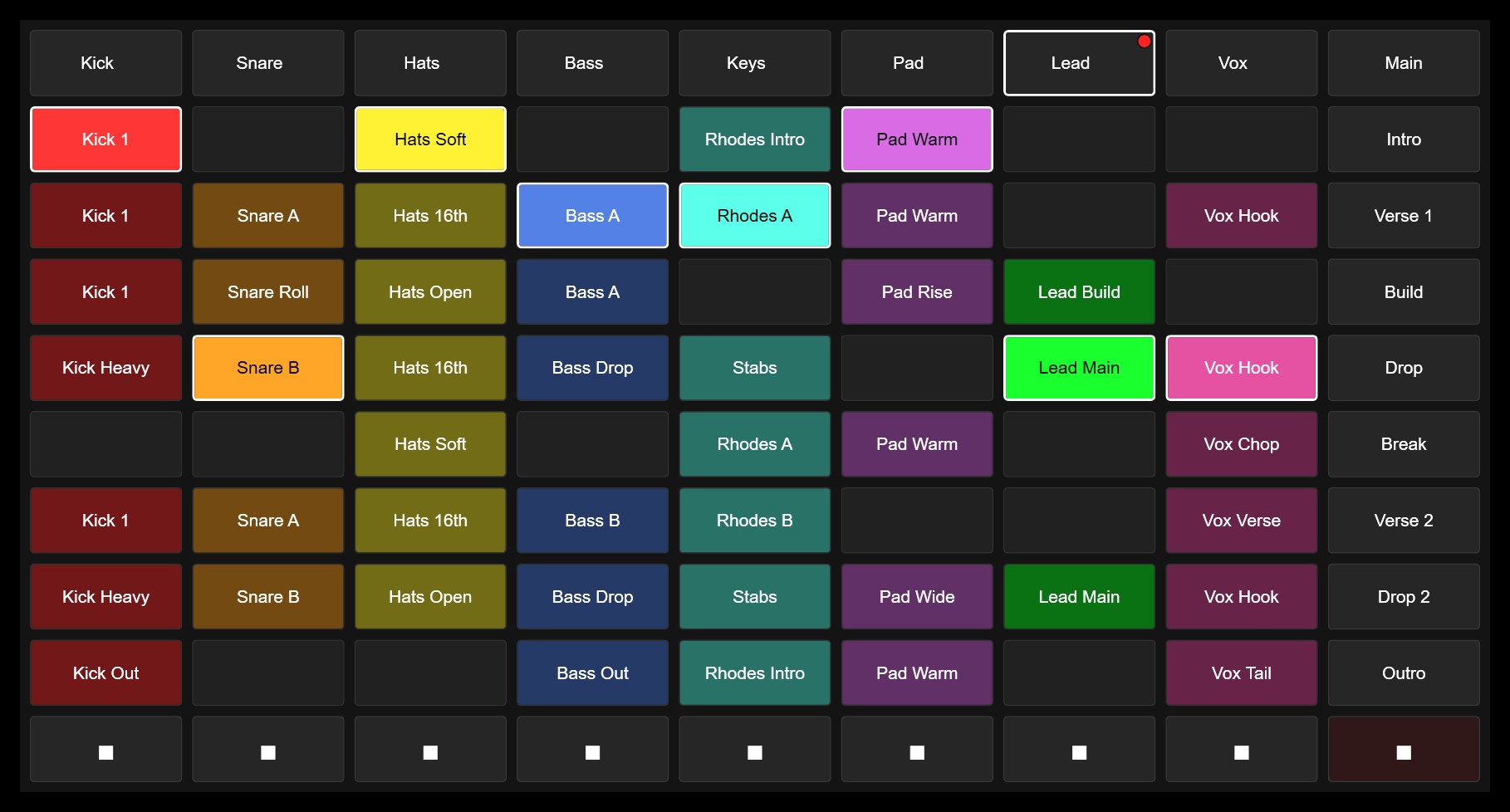
Clip Grid: tracks Kick to Vox with their clips, colours, playing state, scenes Intro to Outro and the stop row

See the plugin on the surface

The UI Display widget captures any rectangle of any window, a plugin's display included, and shows it live on your surface, so your eyes stay on the touchscreen while your hands work. And the same scripts that drive the Device Panel give you the clip grid above, with the real clip names and colours.

Same script, more than plugins

The Zonea scripts for Live, Bitwig and FL Studio also give you a clip grid with the real clip colours and names, scene launch and stop, a mixer with DAW meters, transport, and in FL Studio the step sequencer. All of it without mapping a single control. See everything Zonea does.

The free trial has no time limit: Performance mode runs on pages 1 and 2, design mode is fully open. One license covers Windows, macOS and Linux.